
Context-Based Multi-Threaded Execution
Contexts have no effect in the engine as it ships.
contextdeclarations and.context(...)parse and passvarpulis check, but the threads and channels behind them belong to the engine's asynchronous runtime, which neithervarpulis simulatenor a Vejas detect unit includes (see ADR-008). A program with contexts runs on one thread, exactly like the same program without them. In Vejas, work runs in parallel as separate detect units.
Contexts provide isolated execution domains for stream processing. Each context runs on its own OS thread with a single-threaded Tokio runtime, enabling true parallelism without locks within a context.
Table of Contents
- Overview
- Declaring Contexts
- Assigning Streams to Contexts
- Cross-Context Communication
- CPU Affinity
- Tutorial: Multi-Context IoT Pipeline
- Architecture
- Best Practices
Overview
By default, Varpulis runs all streams in a single thread. When you declare contexts, the engine partitions streams across OS threads, each with its own event loop and state. This gives you:
- True parallelism: Each context runs on a separate OS thread
- No shared state: No
Arc<Mutex>within a context; all state is thread-local - CPU pinning: Optional core affinity for predictable latency
- Zero overhead when unused: Programs without context declarations run identically to before
When to Use Contexts
Use contexts when you need to:
- Separate high-throughput ingestion from slower analytics
- Pin latency-sensitive streams to dedicated CPU cores
- Isolate fault domains (a crash in one context doesn't affect others)
- Scale across multiple cores for CPU-bound workloads
Declaring Contexts
Declare contexts at the top of your VPL program using the context keyword:
# Basic context declaration
context ingestion

# Context with CPU affinity
context analytics (cores: [2, 3])

# Multiple contexts
context ingestion (cores: [0, 1])
context analytics (cores: [2, 3])
context alerts (cores: [4])
Syntax
context <name>
context <name> (cores: [<core_id>, ...])<name>: A unique identifier for the contextcores: Optional list of CPU core IDs for thread pinning (Linux only)
Assigning Streams to Contexts
Use the .context() operation in a stream pipeline to assign it to a context:
context ingestion (cores: [0, 1])
context analytics (cores: [2, 3])

# This stream runs in the ingestion context
stream RawEvents = SensorReading
    .context(ingestion)
    .where(value > 0)
    .emit(sensor_id: sensor_id, value: value)

# This stream runs in the analytics context
stream Stats = SensorReading
    .context(analytics)
    .window(1m)
    .aggregate(avg_value: avg(value), count: count())
Streams without .context() run in the default single-threaded engine (backward compatible).
Cross-Context Communication
Use context: in an .emit() to send events from one context to another:
context ingestion (cores: [0])
context analytics (cores: [1])
context alerts (cores: [2])

# Ingestion context: filter and forward to analytics
stream FilteredEvents = SensorReading
    .context(ingestion)
    .where(value > threshold)
    .emit(context: analytics, sensor_id: sensor_id, value: value)

# Analytics context: aggregate and forward to alerts
stream AggregatedStats = FilteredEvents
    .context(analytics)
    .window(1m)
    .aggregate(avg_value: avg(value), max_value: max(value))
    .emit(context: alerts, avg_value: avg_value, max_value: max_value)

# Alerts context: emit alerts for critical conditions
stream CriticalAlerts = AggregatedStats
    .context(alerts)
    .where(max_value > 200)
    .emit(alert_type: "CriticalTemperature", message: "Max value exceeded threshold")
Cross-context events are delivered via bounded mpsc channels. The channel capacity is configurable (default: 1000 events).
CPU Affinity
On Linux, contexts can be pinned to specific CPU cores for predictable performance:
# Pin to a single core
context latency_sensitive (cores: [0])

# Pin to multiple cores (first core in list is used for thread affinity)
context batch_processing (cores: [4, 5, 6, 7])
CPU affinity is set via the core_affinity crate. On non-Linux platforms, the affinity parameter is accepted but has no effect (a debug log message is emitted).
Choosing Cores
- Use
lscpuornumactl --hardwareto identify core topology - Keep related contexts on the same NUMA node to minimize memory access latency
- Reserve core 0 for the OS and system interrupts
- Use isolated cores (
isolcpuskernel parameter) for lowest jitter
Tutorial: Multi-Context IoT Pipeline
This tutorial builds a complete IoT monitoring system with three contexts.
Step 1: Define Contexts
# Three-stage pipeline
context ingest (cores: [1])     # High-throughput event ingestion
context analyze (cores: [2])    # Windowed analytics
context alert (cores: [3])      # Alert generation and delivery
Step 2: Ingestion Stage
# Fast filtering in the ingestion context
context ingest (cores: [1])     # declared in Step 1
context analyze (cores: [2])

stream ValidReadings = SensorReading
    .context(ingest)
    .where(value > 0 and sensor_id != "")
    .emit(context: analyze, sensor_id: sensor_id, value: value, zone: zone)
Step 3: Analytics Stage
# Per-zone statistics in the analytics context
context analyze (cores: [2])    # declared in Step 1
context alert (cores: [3])

stream ZoneStats = ValidReadings
    .context(analyze)
    .partition_by(zone)
    .window(1m)
    .aggregate(
        zone: last(zone),
        avg_value: avg(value),
        max_value: max(value),
        reading_count: count()
    )
    .emit(context: alert, zone: zone, avg_value: avg_value, max_value: max_value, reading_count: reading_count)
Step 4: Alert Stage
# Alert on anomalies in the alert context
context alert (cores: [3])      # declared in Step 1

stream OverheatAlerts = ZoneStats
    .context(alert)
    .where(max_value > 150)
    .emit(alert_type: "ZoneOverheat", message: "Zone overheated")

stream LowActivityAlerts = ZoneStats
    .context(alert)
    .where(reading_count < 5)
    .emit(alert_type: "LowActivity", message: "Low sensor activity")
Complete Program
# IoT Monitoring Pipeline with Contexts
# Three isolated execution domains for maximum throughput

context ingest (cores: [1])
context analyze (cores: [2])
context alert (cores: [3])

stream ValidReadings = SensorReading
    .context(ingest)
    .where(value > 0 and sensor_id != "")
    .emit(context: analyze, sensor_id: sensor_id, value: value, zone: zone)

stream ZoneStats = ValidReadings
    .context(analyze)
    .partition_by(zone)
    .window(1m)
    .aggregate(
        zone: last(zone),
        avg_value: avg(value),
        max_value: max(value),
        reading_count: count()
    )
    .emit(context: alert, zone: zone, avg_value: avg_value, max_value: max_value, reading_count: reading_count)

stream OverheatAlerts = ZoneStats
    .context(alert)
    .where(max_value > 150)
    .emit(alert_type: "ZoneOverheat", message: "Zone overheated")
The threshold could as well be a named constant: with let threshold = 150 at the top of the program, .where(max_value > threshold) compares with 150. (A var would not do: streams do not see vars, and would read an event field named threshold instead.)
Running It
# Check syntax
varpulis check iot_pipeline.vpl

# Run with simulation
varpulis simulate -p iot_pipeline.vpl -e sensor_data.evt

# On a bus, the program is a Vejas detect unit: put it under detects/
varpulis check iot_pipeline.vpl
Session Window Lifecycle
Session windows (.window(session: <gap>)) group events separated by periods of inactivity. They have two mechanisms for closing sessions:
Event-Driven Gap Detection (Hot Path)
When a new event arrives and the time since the last event exceeds the configured gap, the current session closes immediately and the new event starts a fresh session. This is the primary closure mechanism and operates per-event with no timer overhead.
Periodic Sweep (Background)
If no events arrive after a session's last event, the event-driven mechanism never fires. To handle this, each context with session windows runs a background sweep timer. The sweep:
- Runs every
gapduration (matching the session window's configured gap) - Checks all session windows for partitions where
last_event_time + gap < now - Closes expired sessions and pushes results through the rest of the pipeline (aggregate, having, emit, etc.)
This ensures stale sessions are emitted even when a stream goes idle.
Zero Overhead for Non-Session Workloads
The sweep timer is guarded by a has_sessions flag. Contexts without session windows never create or poll the timer -- there is zero overhead for non-session workloads.
Shutdown Flush
When a context shuts down (via the shutdown signal), all remaining session windows are flushed regardless of whether they have expired. This ensures no data is lost on clean shutdown.
Batch/Simulation Mode
In simulation mode (no contexts), flush_expired_sessions() is called once after all events have been processed. This closes any trailing sessions that would otherwise remain open because no subsequent event triggered the gap detection.
Architecture
Internal Design
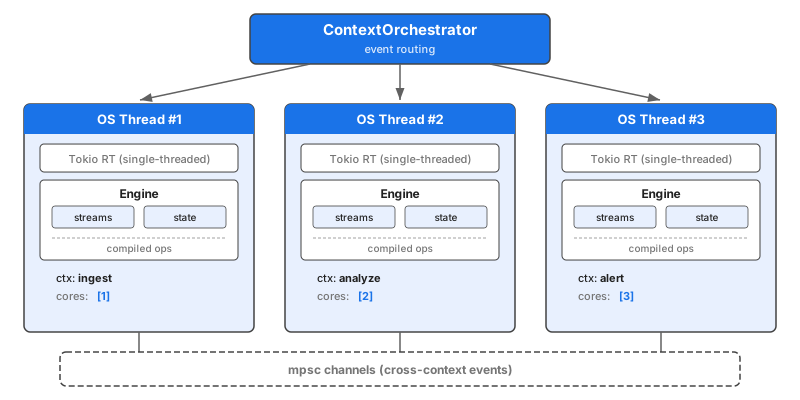
Key Components
| Component | Description |
|---|---|
ContextMap | Tracks context declarations, stream assignments, and cross-context emits |
ContextRuntime | Per-context event loop with its own Engine instance |
ContextOrchestrator | Spawns threads, builds routing table, dispatches events |
Event Routing
- External events enter through the
ContextOrchestrator - The orchestrator looks up the event type in its ingress routing table
- The event is sent to the correct context via a bounded
mpscchannel - The context's
ContextRuntimeprocesses the event through its localEngine - Cross-context emits are forwarded via additional
mpscchannels
Backward Compatibility
When no context declarations are present:
ContextMap::has_contexts()returnsfalse- The engine runs directly in single-threaded mode
- No threads are spawned, no channels are created
- Zero runtime overhead
Best Practices
1. Separate by Workload Profile
Group streams with similar characteristics:
# High-throughput, low-latency filtering
context fast_path (cores: [0, 1])

# CPU-intensive analytics
context heavy_compute (cores: [2, 3, 4, 5])

# I/O-bound alert delivery
context io_bound (cores: [6])
2. Minimize Cross-Context Traffic
Each cross-context emit goes through a channel. Minimize boundary crossings:
context ingestion
context analytics

# Good: filter before crossing context boundary
stream Filtered = RawData
    .context(ingestion)
    .where(important == true)  # Reduce volume first
    .emit(context: analytics, data: data)

# Less optimal: send everything, filter later
stream Unfiltered = RawData
    .context(ingestion)
    .emit(context: analytics, data: data)  # High volume crossing

stream FilteredLate = Unfiltered
    .context(analytics)
    .where(important == true)  # Filtering happens after channel transfer
3. Match Contexts to NUMA Topology
On multi-socket systems, keep related contexts on the same NUMA node:
# Check NUMA topology
numactl --hardware

# Node 0: cores 0-7
# Node 1: cores 8-15# Keep cooperating contexts on same NUMA node
context ingest (cores: [0, 1])
context analyze (cores: [2, 3]) # Same node as ingest
context alerts (cores: [8]) # Different node is OK for alerts4. Reserve Cores for the OS
Don't pin contexts to core 0 on Linux -- it handles interrupts and scheduling:
# Good: start from core 1
context main (cores: [1, 2, 3])

# Avoid: core 0 handles system interrupts
context main (cores: [0, 1, 2])
5. Monitor Context Performance
Use Prometheus metrics to track per-context throughput:
# Check metrics endpoint
curl -s localhost:9090/metrics | grep varpulis_events_processed
See Also
- Contexts Tutorial - Hands-on tutorial with runnable examples
- Architecture: Parallelism - Worker pool parallelism
- Language Syntax - Complete VPL syntax reference