
Connector Security
Overview
Production deployments require secure connections between Varpulis and external systems (Kafka, MQTT, NATS). Varpulis separates security credentials from pipeline logic:
- VPL files contain no secrets. Pipelines reference a named security profile; credentials are loaded from a separate credentials file at runtime.
- AES-256-GCM encryption for secrets at rest. Passwords and tokens in the credentials file can be encrypted with a master key.
- File permission enforcement. Varpulis refuses to start if certificate files or the credentials file have overly permissive permissions.
This design ensures VPL files can be safely committed to version control and shared across teams without exposing sensitive configuration.
Credentials File
Location
The credentials file is resolved in the following order:
--credentialsCLI flagVARPULIS_CREDENTIALSenvironment variable~/.varpulis/credentials.yaml(default)
File Permissions
The credentials file must have 0600 (owner read/write) or 0400 (owner read-only) permissions. Varpulis will refuse to load a credentials file that is group- or world-readable.
chmod 600 ~/.varpulis/credentials.yamlFormat
version: 1
require_encryption: false  # Set true in production

profiles:
  development:
    connector_type: kafka
    properties:
      security_protocol: PLAINTEXT

  production:
    connector_type: kafka
    properties:
      security_protocol: SASL_SSL
      sasl_mechanism: SCRAM-SHA-512
      sasl_username: varpulis-app
      sasl_password: "ENC[AES256-GCM,base64...]"
      ssl_ca_location: /etc/varpulis/certs/ca.pem
      ssl_certificate_location: /etc/varpulis/certs/client.pem
      ssl_key_location: /etc/varpulis/certs/client-key.pem

  mqtt-tls:
    connector_type: mqtt
    properties:
      username: sensor-gateway
      password: "ENC[AES256-GCM,base64...]"
      use_tls: "true"
      ssl_ca_location: /etc/varpulis/certs/ca.pem

  nats-tls:
    connector_type: nats
    properties:
      username: nats-app
      password: "ENC[AES256-GCM,base64...]"
      use_tls: "true"
      ssl_ca_location: /etc/varpulis/certs/ca.pem
      ssl_certificate_location: /etc/varpulis/certs/client.pem
      ssl_key_location: /etc/varpulis/certs/client-key.pem
Each profile has:
connector_type-- The connector this profile applies to (kafka,mqtt,nats).properties-- Key-value pairs passed to the underlying client library (rdkafka, rumqttc, etc.).
When require_encryption: true is set, Varpulis rejects any password or token value that is not wrapped in ENC[...]. This prevents accidentally deploying with plaintext secrets in production.
VPL Usage
Reference a credentials profile using the profile parameter in a connector declaration:
connector Kafka = kafka (
    brokers: "kafka-1:9093,kafka-2:9093",
    topic: "events",
    profile: "production"
)
The profile value must match a profile name in the credentials file. At startup, Varpulis merges the profile properties with the connector declaration -- the profile supplies security parameters while the VPL supplies logical parameters (brokers, topics, group IDs).
If no profile is specified, the connector uses plaintext with no authentication (suitable for local development only).
Master Key Setup
The master key is used to encrypt and decrypt ENC[...] values in the credentials file.
Generate a Master Key
varpulis generate-master-key > /etc/varpulis/master.key
chmod 400 /etc/varpulis/master.key
Provide the Master Key at Runtime
Either point to the key file:
export VARPULIS_MASTER_KEY_FILE=/etc/varpulis/master.keyOr provide the raw hex-encoded key directly (useful in container environments):
export VARPULIS_MASTER_KEY=a3f8...c7d2Encrypt Credentials
To encrypt plaintext passwords in an existing credentials file in-place:
varpulis encrypt-credentials --input credentials.yamlThis replaces each plaintext password, sasl_password, and token value with its ENC[AES256-GCM,base64...] equivalent. The original file is backed up as credentials.yaml.bak.
Kafka SCRAM-SHA-512 + SSL Example
This walkthrough sets up Kafka with SCRAM-SHA-512 authentication over TLS.
Step 1: Generate Certificates
# Create a CA
openssl req -new -x509 -keyout ca-key.pem -out ca.pem -days 365 \
  -subj "/CN=Varpulis-CA" -nodes

# Generate server key and CSR
openssl req -new -keyout server-key.pem -out server.csr \
  -subj "/CN=kafka-broker" -nodes
openssl x509 -req -in server.csr -CA ca.pem -CAkey ca-key.pem \
  -CAcreateserial -out server.pem -days 365

# Generate client key and CSR
openssl req -new -keyout client-key.pem -out client.csr \
  -subj "/CN=varpulis-client" -nodes
openssl x509 -req -in client.csr -CA ca.pem -CAkey ca-key.pem \
  -CAcreateserial -out client.pem -days 365

# Set permissions
chmod 644 ca.pem
chmod 600 server.pem server-key.pem client.pem client-key.pem
Step 2: Configure Kafka Broker
Add to server.properties:
listeners=SASL_SSL://0.0.0.0:9093
advertised.listeners=SASL_SSL://kafka-broker:9093
security.inter.broker.protocol=SASL_SSL

ssl.keystore.location=/etc/kafka/certs/server.keystore.jks
ssl.keystore.password=changeit
ssl.truststore.location=/etc/kafka/certs/server.truststore.jks
ssl.truststore.password=changeit
ssl.client.auth=required

sasl.enabled.mechanisms=SCRAM-SHA-512
sasl.mechanism.inter.broker.protocol=SCRAM-SHA-512
Step 3: Create SCRAM User
kafka-configs.sh --bootstrap-server localhost:9093 \
  --alter --add-config 'SCRAM-SHA-512=[iterations=8192,password=s3cureP@ss]' \
  --entity-type users --entity-name varpulis-app
Step 4: Create Credentials File
version: 1
require_encryption: true

profiles:
  production:
    connector_type: kafka
    properties:
      security_protocol: SASL_SSL
      sasl_mechanism: SCRAM-SHA-512
      sasl_username: varpulis-app
      sasl_password: "s3cureP@ss"  # will be encrypted below
      ssl_ca_location: /etc/varpulis/certs/ca.pem
      ssl_certificate_location: /etc/varpulis/certs/client.pem
      ssl_key_location: /etc/varpulis/certs/client-key.pem
Then encrypt:
varpulis generate-master-key > /etc/varpulis/master.key
chmod 400 /etc/varpulis/master.key
export VARPULIS_MASTER_KEY_FILE=/etc/varpulis/master.key

varpulis encrypt-credentials --input credentials.yaml
chmod 600 credentials.yaml
Step 5: Write the VPL Pipeline
connector Kafka = kafka (
    brokers: "kafka-1:9093,kafka-2:9093",
    group_id: "varpulis-prod",
    topic: "sensor-events",
    profile: "production"
)

event SensorReading:
    sensor_id: str
    temperature: float
    humidity: float

stream Sensors = SensorReading
    .from(Kafka, topic: "sensor-events")

stream HighTemp = SensorReading
    .where(temperature > 50.0)
    .emit(alert: "HIGH_TEMP", sensor_id: sensor_id, temperature: temperature)
    .to(Kafka)
Step 6: Run the Pipeline
varpulis run -f pipeline.vpl --credentials credentials.yamlOr with the environment variable:
export VARPULIS_CREDENTIALS=/etc/varpulis/credentials.yaml
varpulis run -f pipeline.vpl
Kafka mTLS Example
Mutual TLS (mTLS) uses client certificates for authentication instead of username/password. No SASL mechanism is needed.
Credentials File
version: 1

profiles:
  kafka-mtls:
    connector_type: kafka
    properties:
      security_protocol: SSL
      ssl_ca_location: /etc/varpulis/certs/ca.pem
      ssl_certificate_location: /etc/varpulis/certs/client.pem
      ssl_key_location: /etc/varpulis/certs/client-key.pem
VPL
connector Kafka = kafka (
    brokers: "kafka-1:9093,kafka-2:9093",
    group_id: "varpulis-mtls",
    profile: "kafka-mtls"
)

stream Events = MyEvent
    .from(Kafka, topic: "events")
With mTLS, the Kafka broker authenticates the client by verifying the client certificate against its truststore. No passwords are transmitted.
MQTT TLS Example
MQTT supports TLS encryption and optional mTLS via the use_tls parameter and certificate paths.
Credentials File
version: 1

profiles:
  mqtt-secure:
    connector_type: mqtt
    properties:
      username: sensor-gateway
      password: "s3cureP@ss"
      use_tls: "true"
      ssl_ca_location: /etc/varpulis/certs/ca.pem
For mTLS (client certificate authentication):
  mqtt-mtls:
    connector_type: mqtt
    properties:
      use_tls: "true"
      ssl_ca_location: /etc/varpulis/certs/ca.pem
      ssl_certificate_location: /etc/varpulis/certs/client.pem
      ssl_key_location: /etc/varpulis/certs/client-key.pem
VPL
connector MQTT = mqtt (
    host: "mqtt-broker.example.com",
    port: "8883",
    topic: "sensors/temperature",
    profile: "mqtt-secure"
)

stream Sensors = SensorReading
    .from(MQTT, topic: "sensors/temperature")
Port 8883 is the standard MQTT-over-TLS port. The use_tls: true property activates TLS on the rumqttc client using the rustls backend.
NATS TLS Example
NATS supports TLS encryption and mTLS via the use_tls parameter. The async-nats client handles TLS negotiation automatically.
Credentials File
version: 1

profiles:
  nats-secure:
    connector_type: nats
    properties:
      username: nats-app
      password: "s3cureP@ss"
      use_tls: "true"
      ssl_ca_location: /etc/varpulis/certs/ca.pem
      ssl_certificate_location: /etc/varpulis/certs/client.pem
      ssl_key_location: /etc/varpulis/certs/client-key.pem
VPL
connector NATS = nats (
    servers: "tls://nats-1.example.com:4222,tls://nats-2.example.com:4222",
    profile: "nats-secure"
)

stream Events = MyEvent
    .from(NATS, subject: "events.>")
When use_tls: true is set, NATS will require TLS on the connection. If client certificates are provided, the NATS server can authenticate the client via mTLS.
File Permission Requirements
Varpulis enforces strict file permissions on security-sensitive files. The process will exit with an error if permissions are too open.
| File | Required Permissions | Description |
|---|---|---|
credentials.yaml | 0600 or 0400 | Credentials file |
ca.pem | 0644 (public) | CA certificate |
client.pem | 0600 or 0400 | Client certificate |
client-key.pem | 0600 or 0400 | Client private key |
master.key | 0400 | Master encryption key |
Supported Authentication Methods
Kafka
| Method | security_protocol | sasl_mechanism | Use Case |
|---|---|---|---|
| Plaintext | PLAINTEXT | -- | Development only |
| TLS encryption | SSL | -- | Encrypt traffic, no client auth |
| mTLS | SSL | -- | Certificate-based client auth |
| SASL/PLAIN + TLS | SASL_SSL | PLAIN | Username/password (simple) |
| SASL/SCRAM + TLS | SASL_SSL | SCRAM-SHA-256 or SCRAM-SHA-512 | Username/password (challenge-response) |
| SASL/OAUTHBEARER | SASL_SSL | OAUTHBEARER | Token-based (OAuth 2.0) |
Never use SASL/PLAIN or SASL/SCRAM without TLS. The
SASL_PLAINTEXTprotocol transmits credentials in cleartext and should not be used outside of isolated test networks.
MQTT
| Method | Parameters | Use Case |
|---|---|---|
| Plaintext | -- | Development only |
| Username/password | username, password | Basic auth (use TLS!) |
| TLS encryption | use_tls: true, ssl_ca_location | Encrypt traffic |
| mTLS | use_tls: true, ssl_ca_location, ssl_certificate_location, ssl_key_location | Certificate-based client auth |
NATS
| Method | Parameters | Use Case |
|---|---|---|
| Plaintext | -- | Development only |
| Username/password | username, password | Basic auth (use TLS!) |
| Token auth | token | Token-based auth |
| TLS encryption | use_tls: true, ssl_ca_location | Encrypt traffic |
| mTLS | use_tls: true, ssl_ca_location, ssl_certificate_location, ssl_key_location | Certificate-based client auth |
Security Best Practices
- Never commit credentials files to version control. Add
credentials.yamland*.keyto.gitignore. - Use
require_encryption: truein production. This ensures no plaintext secrets can accidentally slip into the credentials file. - Rotate master keys periodically. Generate a new master key, re-encrypt credentials, and deploy the new key file.
- Use short-lived certificates. Automate certificate renewal with a tool like cert-manager or Vault PKI.
- Monitor certificate expiry. Set up alerts for certificates expiring within 30 days.
- Use separate profiles per environment. Keep
development,staging, andproductionprofiles distinct to avoid cross-environment credential leaks. - Restrict network access. Use firewall rules or security groups to limit which hosts can connect to your Kafka/MQTT brokers.
- Audit credential access. Log when the credentials file is read and which profiles are loaded.
Control Plane UI
The Varpulis Control Plane provides a graphical interface for configuring connector security. Security fields are context-sensitive — SASL and SSL fields appear only when the selected security protocol requires them.
Creating a Secured Connector
Open the Connectors page and click Add Connector. After filling in the basic connection parameters, expand the Security section to configure authentication:
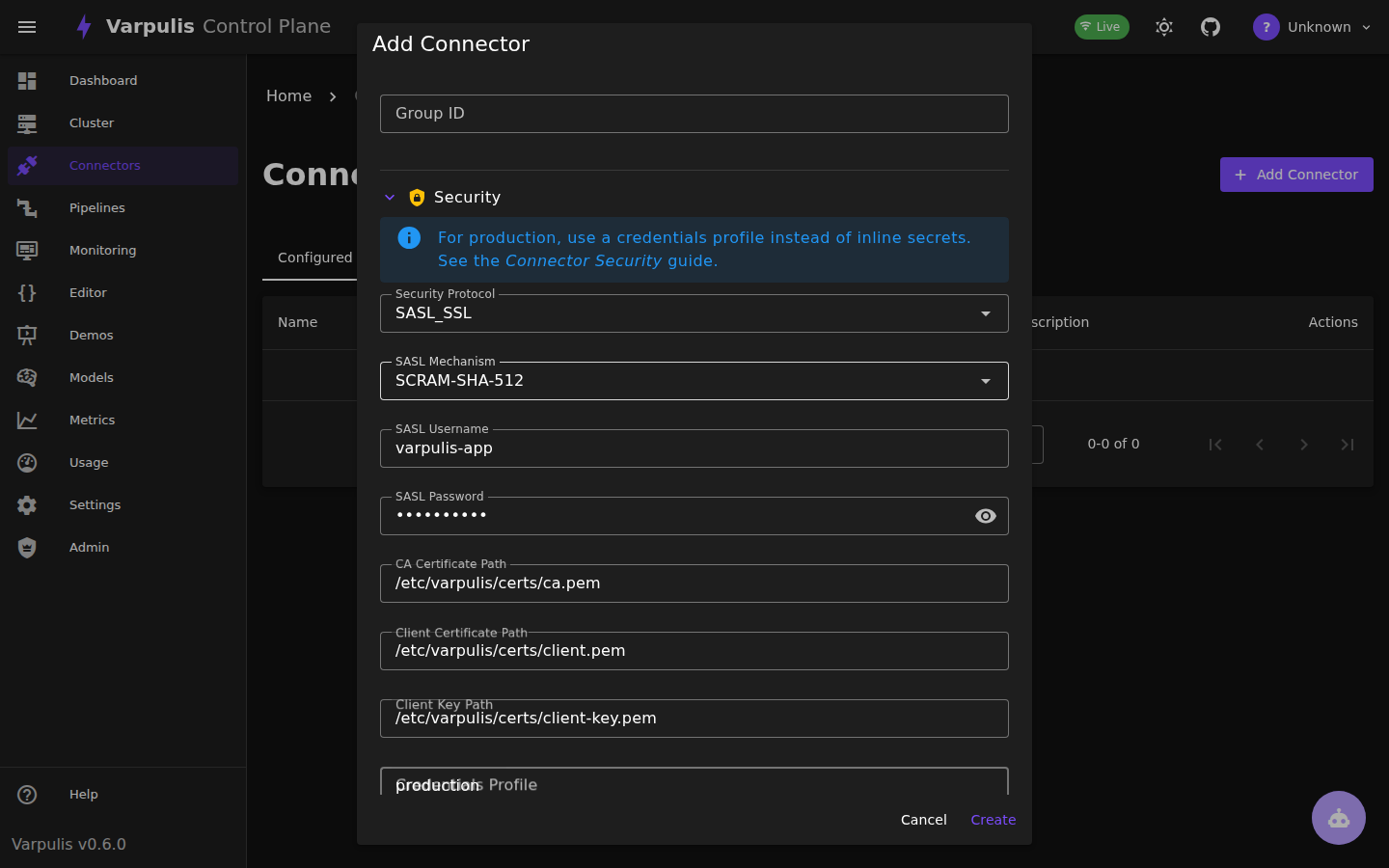
The form adapts to the selected connector type and security settings:
Kafka:
- SASL_SSL: Shows SASL mechanism, username/password, and SSL certificate path fields
- SSL: Shows only SSL certificate fields (CA, client cert, client key)
- SASL_PLAINTEXT: Shows only SASL mechanism and credentials
- PLAINTEXT: Hides all security-specific fields
MQTT / NATS:
- Shows username/password (and token for NATS) fields
- Enable TLS: When set to
true, shows CA certificate, client certificate, and client key path fields - All certificate fields are hidden when TLS is disabled
Passwords are masked by default with a visibility toggle.
Security Badges
Configured connectors display security badges in the connector list, making it easy to audit security posture at a glance:
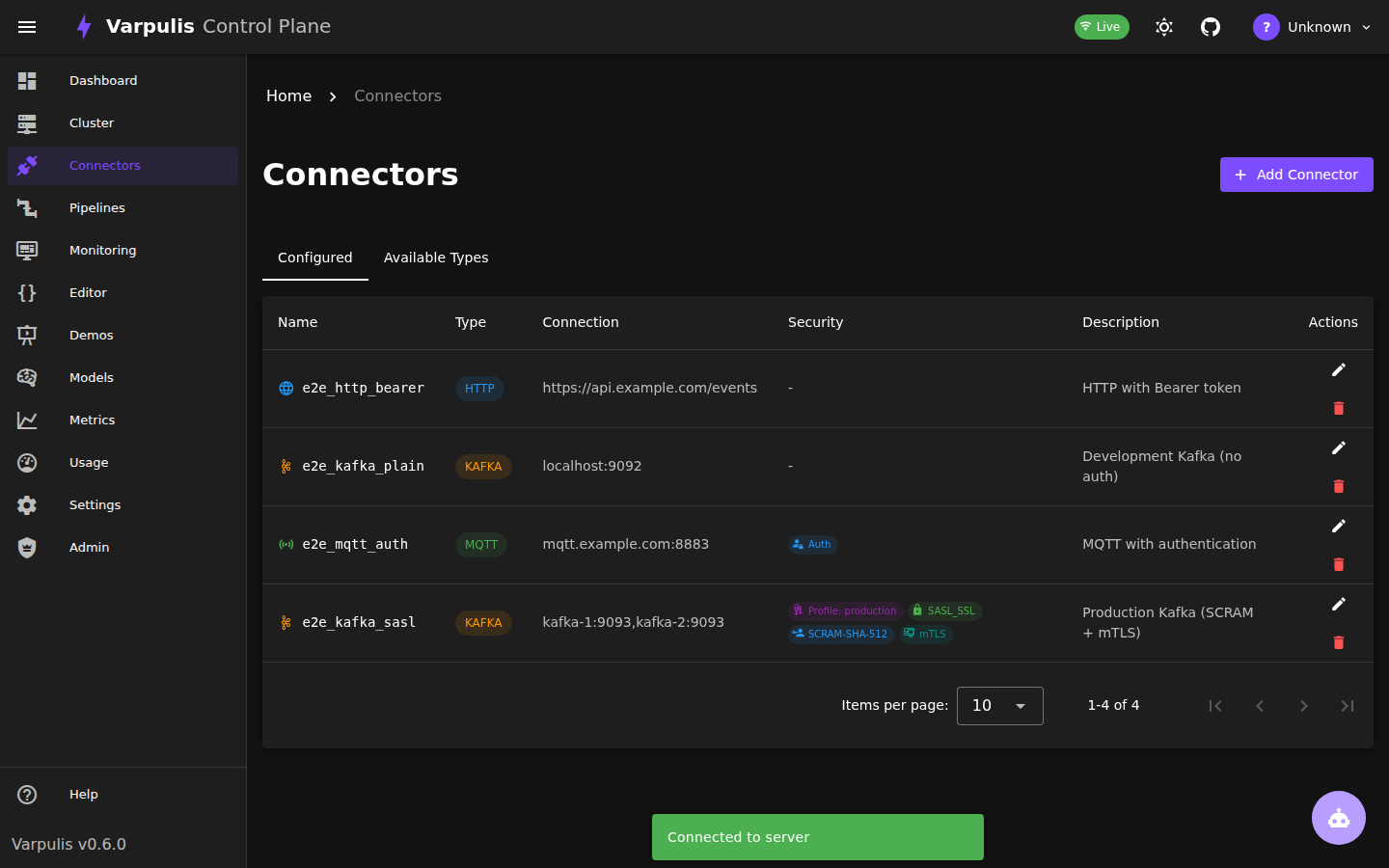
Badge types:
- SASL_SSL / SSL — Kafka transport security protocol
- SCRAM-SHA-512 / SCRAM-SHA-256 / PLAIN — SASL mechanism
- TLS — TLS enabled (MQTT, NATS)
- mTLS — Client certificate configured (mutual TLS)
- Auth — Username/password authentication (MQTT, NATS)
- Profile: name — References a credentials profile
Editing Security Settings
When editing an existing connector, the security section auto-expands if the connector has security parameters. All values are preserved:
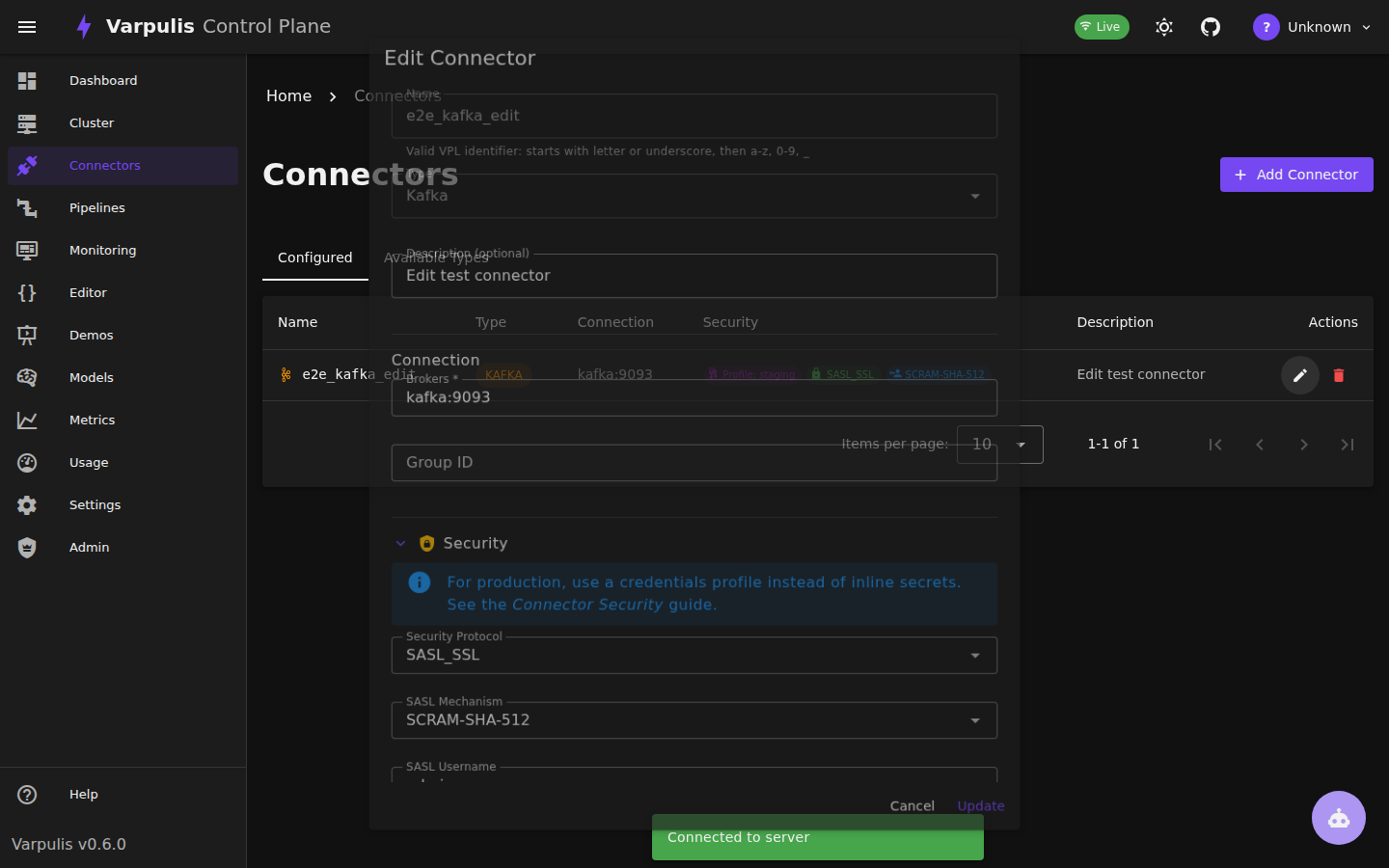
Tip: For production deployments, use a Credentials Profile instead of inline secrets. The profile name references an entry in your
credentials.yamlfile, keeping secrets out of the control plane database.
See Also
- Connectors Reference -- Connector declaration syntax and parameters
- Configuration Guide -- CLI and server configuration
- Performance Tuning -- Kafka batching and throughput tuning