
NATS Transport Architecture
Varpulis uses NATS in two distinct roles: as a data connector for event ingestion/output, and as an internal transport layer for cluster communication between the coordinator and workers.
Overview
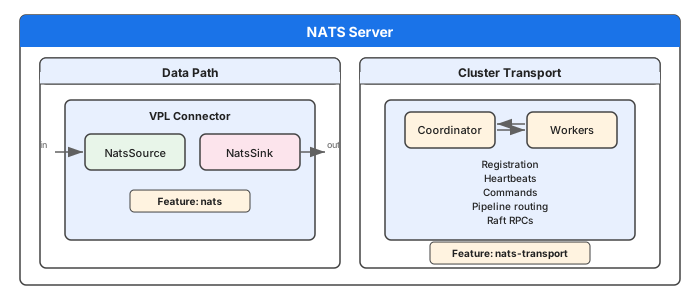
| Aspect | Data Connector | Cluster Transport |
|---|---|---|
| Purpose | User event streaming (IoT, market data) | Coordinator-worker communication |
| Feature flag | nats | nats-transport |
| Crate | varpulis-runtime | varpulis-cluster |
| Subject prefix | User-defined in VPL | varpulis.cluster.* |
| Configuration | VPL connector declarations | Cluster startup parameters |
Cluster Transport Layer
Subject Namespace
All cluster subjects use the varpulis.cluster prefix. NATS uses . as a separator, * for single-token wildcard, and > for multi-token wildcard.
| Subject Pattern | Direction | Pattern | Purpose |
|---|---|---|---|
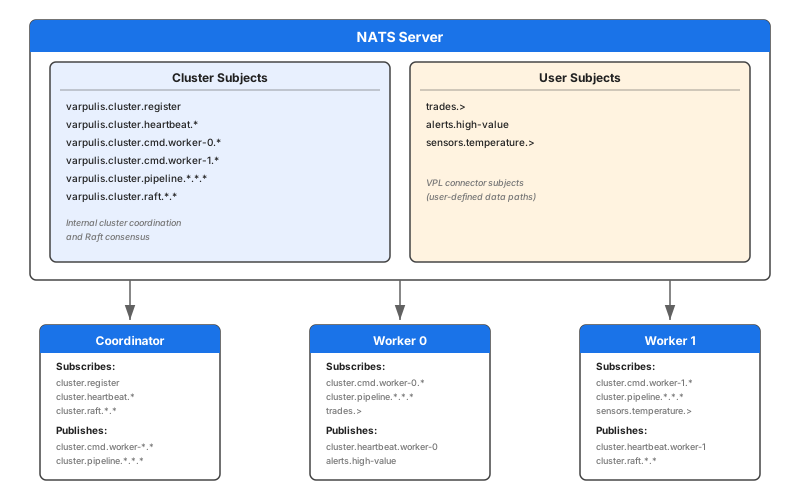
varpulis.cluster.register | Worker -> Coordinator | Request/Reply | Worker self-registration |
varpulis.cluster.heartbeat.{worker_id} | Worker -> Coordinator | Pub/Sub | Health monitoring |
varpulis.cluster.cmd.{worker_id}.{cmd} | Coordinator -> Worker | Request/Reply | Pipeline commands |
varpulis.cluster.cmd.{worker_id}.> | (subscription) | Wildcard | Worker subscribes to all its commands |
varpulis.cluster.pipeline.{group}.{from}.{to} | Worker -> Worker | Pub/Sub | Inter-pipeline event routing |
varpulis.cluster.raft.{node_id}.{rpc} | Node -> Node | Request/Reply | Raft consensus RPCs |
varpulis.cluster.raft.{node_id}.> | (subscription) | Wildcard | Node subscribes to all its RPCs |
Communication Patterns
Worker Registration
When a worker starts with NATS transport enabled, it sends a registration request to the coordinator:

Registration payload:
{
  "worker_id": "worker-0",
  "address": "http://localhost:9000",
  "api_key": "test",
  "capacity": {"cpu_cores": 8, "pipelines_running": 0, "max_pipelines": 100}
}
Response:
{
  "worker_id": "worker-0",
  "status": "registered",
  "heartbeat_interval_secs": 5
}
Heartbeats
Workers publish heartbeats on their dedicated subject. The coordinator subscribes to the wildcard varpulis.cluster.heartbeat.> to receive all heartbeats:

The coordinator extracts the worker_id from the subject's last segment and updates the worker's health metrics.
Command Dispatch
The coordinator sends commands to specific workers using request/reply. Each worker subscribes to varpulis.cluster.cmd.{worker_id}.>:

Available commands:
| Command | Purpose | Payload |
|---|---|---|
deploy | Deploy a pipeline | {name, source} |
undeploy | Remove a pipeline | {pipeline_id} |
inject | Send a single event | {pipeline_id, event_type, fields} |
inject_batch | Send batch of events | {pipeline_id, events} |
checkpoint | Snapshot pipeline state | {pipeline_id} |
restore | Restore from checkpoint | {pipeline_id, checkpoint} |
drain | Graceful shutdown | {} |
Architecture Diagram
Comparison: NATS vs REST Transport
The cluster supports both REST (HTTP) and NATS transport for coordinator-worker communication.
| Feature | REST Transport | NATS Transport |
|---|---|---|
| Registration | POST /api/v1/cluster/workers/register | varpulis.cluster.register (req/reply) |
| Heartbeats | POST /api/v1/cluster/workers/{id}/heartbeat | varpulis.cluster.heartbeat.{id} (pub) |
| Commands | POST /workers/{id}/api/v1/... | varpulis.cluster.cmd.{id}.{cmd} (req/reply) |
| Discovery | Workers need coordinator URL | Workers need NATS URL |
| Connection | Point-to-point HTTP | Multiplexed over single NATS connection |
| Overhead | TCP connection per request | Persistent connection, message framing |
| Inter-pipeline | Via MQTT topics | Via varpulis.cluster.pipeline.* subjects |
NATS transport is recommended when:
- You already run a NATS server for data connectors
- You need lower-latency command dispatch
- You want a single transport layer for both data and control planes
- You're using NATS for inter-pipeline event routing (replaces MQTT for internal comms)
Deployment
Requirements
- nats-server v2.9+ (recommended: v2.10+ for enhanced JetStream support)
- Default port: 4222
- No JetStream required for basic cluster transport (core NATS is sufficient)
Starting nats-server
# Standalone (development)
nats-server

# With monitoring
nats-server -m 8222

# Docker
docker run -d --name nats -p 4222:4222 -p 8222:8222 nats:latest

# Docker Compose (included in Varpulis cluster compose)
# See deploy/docker/docker-compose.cluster.yml
Building with NATS Transport
# Data connector only
cargo build --release --features nats

# Cluster transport only
cargo build --release --features nats-transport

# Both
cargo build --release --features nats,nats-transport

# Everything
cargo build --release --features all-connectors,nats-transport
Authentication
NATS transport currently supports:
- No auth (development)
- User/password via connection options
- Token authentication
For production, configure authentication on your nats-server:
# nats-server.conf
authorization {
  users = [
    {user: "varpulis", password: "secret"}
  ]
}
TLS
TLS is handled by the NATS server configuration. Clients connect using tls:// URLs:
nats-server --tls \
  --tlscert=/path/to/server.crt \
  --tlskey=/path/to/server.key
Workers and coordinators connect via tls://host:4222 instead of nats://host:4222.
Crate Structure
The NATS transport implementation spans two crates:
varpulis-cluster (transport layer)
| File | Purpose |
|---|---|
nats_transport.rs | Subject helpers, connect_nats(), nats_request(), nats_publish(), NatsTransportError |
nats_coordinator.rs | run_coordinator_nats_handler() -- registration and heartbeat subscriptions |
nats_worker.rs | run_worker_nats_handler() -- command subscription and dispatch |
varpulis-runtime (data connector)
| File | Purpose |
|---|---|
connector/nats.rs | NatsSource, NatsSink, NatsConfig, JSON parsing |
connector/managed_nats.rs | ManagedNatsConnector -- shared client, health tracking |
connector/managed_registry.rs | Factory: creates NATS connectors from ConnectorConfig |
See Also
- Cluster Architecture -- Coordinator, workers, placement, REST API
- Connectors Reference -- NATS data connector syntax
- NATS Connector Tutorial -- Step-by-step NATS setup
- Configuration Guide -- NATS configuration options