
Distributed Execution (Cluster Mode)
Varpulis supports distributed execution across multiple worker processes, coordinated by a central control plane. This enables horizontal scaling of pipeline processing by distributing workloads across machines.
Architecture
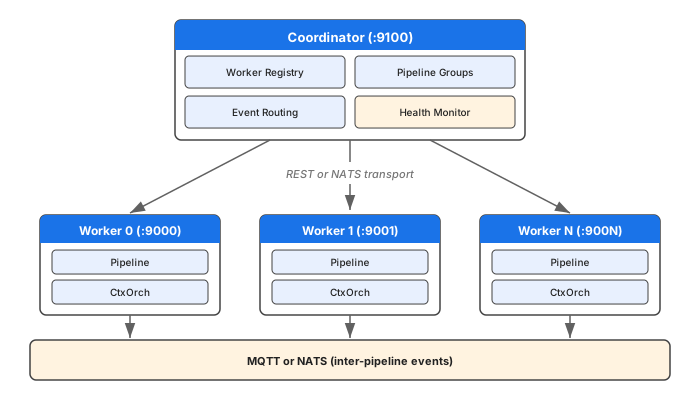
Key Principles
- Workers are standard
varpulis serverprocesses that register with a coordinator - The coordinator manages deployment, routing, and health — it does NOT process events itself
- Inter-pipeline communication uses MQTT or NATS (see NATS Transport Architecture)
- Each worker runs one or more pipelines with their own ContextOrchestrators
- The API is backward-compatible: existing single-server mode still works unchanged
Components
| Component | Description |
|---|---|
| Coordinator | Central control plane. Manages worker registry, pipeline placement, event routing, and health monitoring. |
| Worker | A standard varpulis server process that registers with a coordinator. Runs assigned pipelines. |
| Pipeline Group | A collection of related pipelines deployed together with routing rules. |
| Routing Table | Maps event types to target pipelines using wildcard pattern matching. |
| Placement Strategy | Algorithm for deciding which worker runs which pipeline (round-robin, least-loaded, or affinity-based). |
Quick Start
1. Start the Coordinator
varpulis coordinator --port 9100 --api-key admin2. Start Workers
Each worker is a standard varpulis server with --coordinator flag:
# Worker 0
varpulis server --port 9000 --api-key test \
    --coordinator http://localhost:9100 \
    --worker-id worker-0

# Worker 1
varpulis server --port 9001 --api-key test \
    --coordinator http://localhost:9100 \
    --worker-id worker-1
Workers auto-register with the coordinator on startup and begin sending heartbeats.
3. Deploy a Pipeline Group
curl -X POST http://localhost:9100/api/v1/cluster/pipeline-groups \
  -H "x-api-key: admin" \
  -H "Content-Type: application/json" \
  -d '{
    "name": "my-group",
    "pipelines": [
      {"name": "ingest", "source": "stream A = EventA .emit(result: \"ok\")", "worker_affinity": "worker-0"},
      {"name": "analyze", "source": "stream B = EventB .emit(result: \"ok\")", "worker_affinity": "worker-1"}
    ],
    "routes": [
      {"from_pipeline": "_external", "to_pipeline": "ingest", "event_types": ["EventA*"]},
      {"from_pipeline": "_external", "to_pipeline": "analyze", "event_types": ["EventB*"]}
    ]
  }'
4. Inject Events via Coordinator
curl -X POST http://localhost:9100/api/v1/cluster/pipeline-groups/{group_id}/inject \
  -H "x-api-key: admin" \
  -H "Content-Type: application/json" \
  -d '{"event_type": "EventA", "fields": {"x": 42}}'
The coordinator routes the event to the correct worker based on the routing rules.
CLI Reference
varpulis coordinator
Start the cluster coordinator (control plane).
varpulis coordinator [OPTIONS]

Options:
  -p, --port <PORT>        Coordinator port [default: 9100]
      --bind <BIND>        Bind address [default: 127.0.0.1]
      --api-key <API_KEY>  API key for authentication [env: VARPULIS_API_KEY]
varpulis server (with cluster flags)
Start a worker that registers with a coordinator.
varpulis server [OPTIONS]

Cluster Options:
      --coordinator <URL>    Coordinator URL (e.g., http://localhost:9100)
                             [env: VARPULIS_COORDINATOR]
      --worker-id <ID>       Worker identifier (auto-generated if not set)
                             [env: VARPULIS_WORKER_ID]
When --coordinator is provided, the worker:
- Starts normally as a REST/WebSocket server
- Registers with the coordinator via
POST /api/v1/cluster/workers/register - Sends heartbeats every 5 seconds
- Retries registration with exponential backoff if coordinator is unavailable
Coordinator REST API
All endpoints under /api/v1/cluster/. Authentication via x-api-key header when --api-key is configured.
Worker Management
| Method | Path | Description |
|---|---|---|
POST | /workers/register | Worker self-registration |
POST | /workers/{id}/heartbeat | Worker heartbeat |
GET | /workers | List registered workers |
GET | /workers/{id} | Get worker details |
DELETE | /workers/{id} | Deregister worker |
Register Worker
curl -X POST http://localhost:9100/api/v1/cluster/workers/register \
  -H "x-api-key: admin" -H "Content-Type: application/json" \
  -d '{
    "worker_id": "worker-0",
    "address": "http://localhost:9000",
    "api_key": "test",
    "capacity": {"cpu_cores": 8, "pipelines_running": 0, "max_pipelines": 100}
  }'
Response:
{"worker_id": "worker-0", "status": "registered"}List Workers
curl http://localhost:9100/api/v1/cluster/workers -H "x-api-key: admin"Response:
{
  "workers": [
    {
      "id": "worker-0",
      "address": "http://localhost:9000",
      "status": "ready",
      "pipelines_running": 1,
      "max_pipelines": 100,
      "assigned_pipelines": ["ingest"]
    }
  ],
  "total": 1
}
Heartbeat
Workers send heartbeats every 5 seconds. No auth required for heartbeats.
curl -X POST http://localhost:9100/api/v1/cluster/workers/worker-0/heartbeat \
  -H "Content-Type: application/json" \
  -d '{"events_processed": 1000, "pipelines_running": 2}'
Pipeline Group Management
| Method | Path | Description |
|---|---|---|
POST | /pipeline-groups | Deploy a pipeline group |
GET | /pipeline-groups | List pipeline groups |
GET | /pipeline-groups/{id} | Get group status |
DELETE | /pipeline-groups/{id} | Tear down group |
POST | /pipeline-groups/{id}/inject | Inject event (coordinator routes it) |
Deploy Pipeline Group
curl -X POST http://localhost:9100/api/v1/cluster/pipeline-groups \
  -H "x-api-key: admin" -H "Content-Type: application/json" \
  -d '{
    "name": "my-app",
    "pipelines": [
      {"name": "pipeline-a", "source": "stream A = X .emit(v: 1)", "worker_affinity": "worker-0"},
      {"name": "pipeline-b", "source": "stream B = Y .emit(v: 2)"}
    ],
    "routes": [
      {"from_pipeline": "_external", "to_pipeline": "pipeline-a", "event_types": ["TypeA*"]},
      {"from_pipeline": "_external", "to_pipeline": "pipeline-b", "event_types": ["TypeB*"]}
    ]
  }'
Response:
{
  "id": "uuid-of-group",
  "name": "my-app",
  "status": "running",
  "pipeline_count": 2,
  "placements": [
    {
      "pipeline_name": "pipeline-a",
      "worker_id": "worker-0",
      "worker_address": "http://localhost:9000",
      "pipeline_id": "uuid-on-worker",
      "status": "Running"
    }
  ]
}
Inject Event
The coordinator routes the event to the correct worker based on the group's routing rules:
curl -X POST http://localhost:9100/api/v1/cluster/pipeline-groups/{id}/inject \
  -H "x-api-key: admin" -H "Content-Type: application/json" \
  -d '{"event_type": "TypeA_foo", "fields": {"value": 42}}'
Response:
{
  "routed_to": "pipeline-a",
  "worker_id": "worker-0",
  "worker_response": {"accepted": true, "output_events": [...]}
}
Tear Down Group
Deletes all deployed pipelines from their workers:
curl -X DELETE http://localhost:9100/api/v1/cluster/pipeline-groups/{id} \
  -H "x-api-key: admin"
Topology
curl http://localhost:9100/api/v1/cluster/topology -H "x-api-key: admin"Returns the full routing topology of the cluster:
{
  "groups": [
    {
      "group_id": "...",
      "group_name": "my-app",
      "pipelines": [
        {"name": "pipeline-a", "worker_id": "worker-0", "worker_address": "http://localhost:9000"}
      ],
      "routes": [
        {"from_pipeline": "_external", "to_pipeline": "pipeline-a", "event_types": ["TypeA*"]}
      ]
    }
  ]
}
Pipeline Group Specification
A pipeline group is defined by a JSON specification:
{
  "name": "group-name",
  "pipelines": [
    {
      "name": "pipeline-name",
      "source": "stream A = X .emit(v: 1)",
      "worker_affinity": "worker-0"
    }
  ],
  "routes": [
    {
      "from_pipeline": "_external",
      "to_pipeline": "pipeline-name",
      "event_types": ["EventTypePattern*"],
      "mqtt_topic": "optional/custom/topic"
    }
  ]
}
Fields
| Field | Type | Required | Description |
|---|---|---|---|
name | string | Yes | Human-readable name for the group |
pipelines | array | Yes | List of pipelines to deploy |
pipelines[].name | string | Yes | Pipeline identifier within the group |
pipelines[].source | string | Yes | VPL source code for the pipeline |
pipelines[].worker_affinity | string | No | Preferred worker ID. Falls back to placement strategy if unavailable. |
routes | array | No | Event routing rules |
routes[].from_pipeline | string | Yes | Source pipeline (_external for injected events) |
routes[].to_pipeline | string | Yes | Destination pipeline name |
routes[].event_types | array | Yes | Event type patterns (supports trailing * wildcard) |
routes[].mqtt_topic | string | No | Custom MQTT topic (auto-generated if not set) |
Event Type Pattern Matching
Routing rules use simple pattern matching:
| Pattern | Matches |
|---|---|
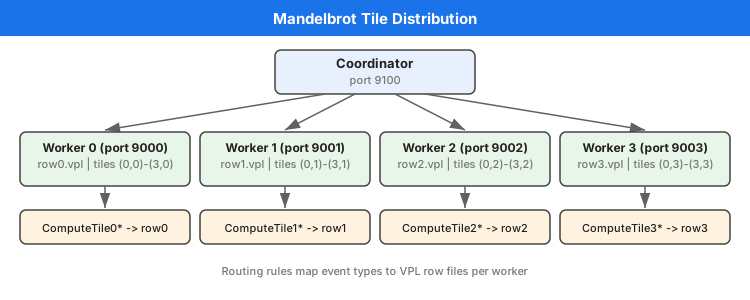
ComputeTile0* | ComputeTile00, ComputeTile01, ComputeTile0Foo, ... |
SensorReading | Only SensorReading (exact match) |
* | Everything |
Placement Strategies
The coordinator uses a placement strategy to decide which worker runs each pipeline.
Round-Robin (Default)
Distributes pipelines evenly across available workers in order.
Worker Affinity
Use worker_affinity in the pipeline spec to pin a pipeline to a specific worker:
{"name": "row0", "source": "...", "worker_affinity": "worker-0"}If the specified worker is unavailable, falls back to the default placement strategy.
Least-Loaded
Available programmatically via LeastLoadedPlacement. Picks the worker with the fewest running pipelines.
Health Monitoring
Heartbeat Protocol
- Workers send heartbeats every 5 seconds to
POST /api/v1/cluster/workers/{id}/heartbeat - Body includes:
events_processed,pipelines_running - Coordinator marks a worker Unhealthy if no heartbeat for 15 seconds
Worker States
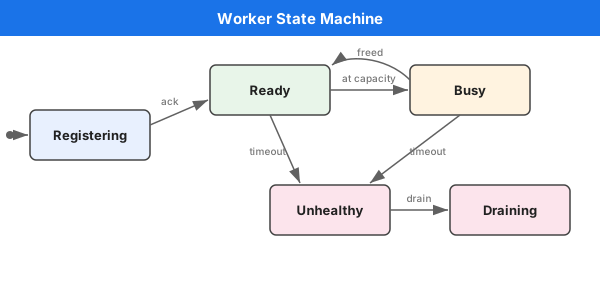
| State | Description |
|---|---|
Registering | Worker is connecting (transient) |
Ready | Worker is available for pipeline deployment |
Busy | Worker is at capacity |
Unhealthy | No heartbeat received within timeout |
Draining | Worker is shutting down gracefully |
Health Sweep
The coordinator runs a background health sweep every 5 seconds. Workers that miss 3 consecutive heartbeats (15 seconds) are marked unhealthy.
If an unhealthy worker sends a heartbeat, it is automatically marked ready again.
Deployment Options
Local Development
# Terminal 1: Coordinator
varpulis coordinator --port 9100 --api-key admin

# Terminal 2-5: Workers
for i in 0 1 2 3; do
    varpulis server --port $((9000+i)) --api-key test \
        --coordinator http://localhost:9100 --worker-id worker-$i &
done
Docker Compose
See deploy/docker/docker-compose.cluster.yml:
docker compose -f deploy/docker/docker-compose.cluster.yml up -dThis starts:
- 1 coordinator (port 9100)
- 4 workers (ports 9000-9003)
- 1 MQTT broker (port 1883)
- Prometheus + Grafana for monitoring
Kubernetes / Helm
See deploy/helm/varpulis-cluster/:
helm install my-cluster deploy/helm/varpulis-cluster/ \
    --set coordinator.apiKey=my-secret \
    --set workers.replicas=4
Example: Distributed Mandelbrot
The distributed Mandelbrot demo computes a 1000x1000 Mandelbrot set image across 4 worker processes, each handling one row of the 4x4 tile grid.
Architecture
Running
# Using the deployment script
./examples/mandelbrot/distributed/deploy.sh

# Or with Docker Compose
docker compose -f deploy/docker/docker-compose.cluster.yml up -d
# Then deploy the pipeline group via the coordinator API
Benchmarking
Compare single-process vs. distributed execution:
python3 examples/mandelbrot/distributed/bench.pyCrate Structure
The cluster functionality lives in crates/varpulis-cluster/:
| Module | Purpose |
|---|---|
lib.rs | Public API, ClusterError, placement strategies |
coordinator.rs | Coordinator state machine (worker registry, deployment, routing) |
worker.rs | Worker types, registration/heartbeat protocol |
pipeline_group.rs | Pipeline group abstraction and status tracking |
routing.rs | Event routing with wildcard pattern matching |
health.rs | Heartbeat protocol and failure detection |
api.rs | Coordinator REST API (warp routes) |
| nats_transport.rs | NATS subject helpers and request/reply utilities | | nats_coordinator.rs | Coordinator-side NATS handler (registration, heartbeats) | | nats_worker.rs | Worker-side NATS command handler (deploy, inject, etc.) |
Dependencies
varpulis-runtime(for connector types)warp(REST API framework, same as worker API)reqwest(coordinator → worker HTTP calls)async-nats(NATS transport, optional vianats-transportfeature)tokio(async runtime, heartbeat intervals)serde/serde_json(API serialization)
Configuration Reference
Environment Variables
| Variable | Description | Default |
|---|---|---|
VARPULIS_API_KEY | API key for coordinator/worker auth | (none) |
VARPULIS_COORDINATOR | Coordinator URL for worker registration | (none) |
VARPULIS_WORKER_ID | Worker identifier | (auto-generated UUID) |
Timeouts
| Setting | Value | Description |
|---|---|---|
| Heartbeat interval | 5s | How often workers send heartbeats |
| Heartbeat timeout | 15s | Time before marking a worker unhealthy |
| HTTP client timeout | 10s | Timeout for coordinator → worker API calls |
| Registration backoff | 1s-30s | Exponential backoff for registration retries |
See Also
- NATS Transport Architecture -- NATS-based cluster transport (subjects, commands, heartbeats)
- Cluster Tutorial -- Step-by-step guide to running a distributed cluster
- NATS Connector Tutorial -- NATS source/sink setup
- CLI Reference -- Full command-line options for
coordinatorandserver - Contexts Tutorial -- Single-process parallelism (used within each worker)